Design Process
Design Process
1
1
Research
Research
2
2
Define
Define
3
3
Ideate
Ideate
4
4
Prototype
Prototype
5
5
Refine
Refine
Before diving into research, I grounded the project in a design-thinking framework inspired by IDEO. Since Flip & Floss aimed to redesign complex teacher analytics into a more intuitive experience, this approach ensured every design decision stayed human-centered and data-driven.
As the Design Lead, I guided my team of three through each stage—emphasizing clarity, accountability, and collaborative iteration. We used this framework not only to structure our work but also to keep our goals aligned with the client’s mission of helping one million students learn financial literacy.
Before diving into research, I grounded the project in a design-thinking framework inspired by IDEO. Since Flip & Floss aimed to redesign complex teacher analytics into a more intuitive experience, this approach ensured every design decision stayed human-centered and data-driven.
As the Design Lead, I guided my team of three through each stage—emphasizing clarity, accountability, and collaborative iteration. We used this framework not only to structure our work but also to keep our goals aligned with the client’s mission of helping one million students learn financial literacy.


Flip & Floss is an innovative EdTech startup focused on financial literacy, with a mission to help one million children learn how to manage money confidently. Our design team was tasked to improve the teacher experience — specifically the Performance Tracking and Teacher Analytics features.
As the Design Lead, I led a 3-person team to conceptualize and design end-to-end userflows that would make teaching analytics simpler, faster, and more actionable.
Flip & Floss is an innovative EdTech startup focused on financial literacy, with a mission to help one million children learn how to manage money confidently. Our design team was tasked to improve the teacher experience — specifically the Performance Tracking and Teacher Analytics features.
As the Design Lead, I led a 3-person team to conceptualize and design end-to-end userflows that would make teaching analytics simpler, faster, and more actionable.
Our goal was to design an experience where teachers could log in, instantly understand their class’s progress, and take direct actions — like assigning practice, tracking mastery, or sending feedback — all within one unified system.
Our goal was to design an experience where teachers could log in, instantly understand their class’s progress, and take direct actions — like assigning practice, tracking mastery, or sending feedback — all within one unified system.
Flip & Floss - Userflow Design
Flip & Floss - Userflow Design
Role
Design Lead (Research, UX, UI)
Role
Design Lead (Research, UX, UI)
Time length
3 weeks
Time length
3 weeks
Tools used
Figma
Prototype
Tools used
Figma
Prototype


Research
Research
I began by researching platforms like TeacherEase, Schoolytics, EverFi, and Google Classroom to benchmark data systems and teacher workflows.
I began by researching platforms like TeacherEase, Schoolytics, EverFi, and Google Classroom to benchmark data systems and teacher workflows.
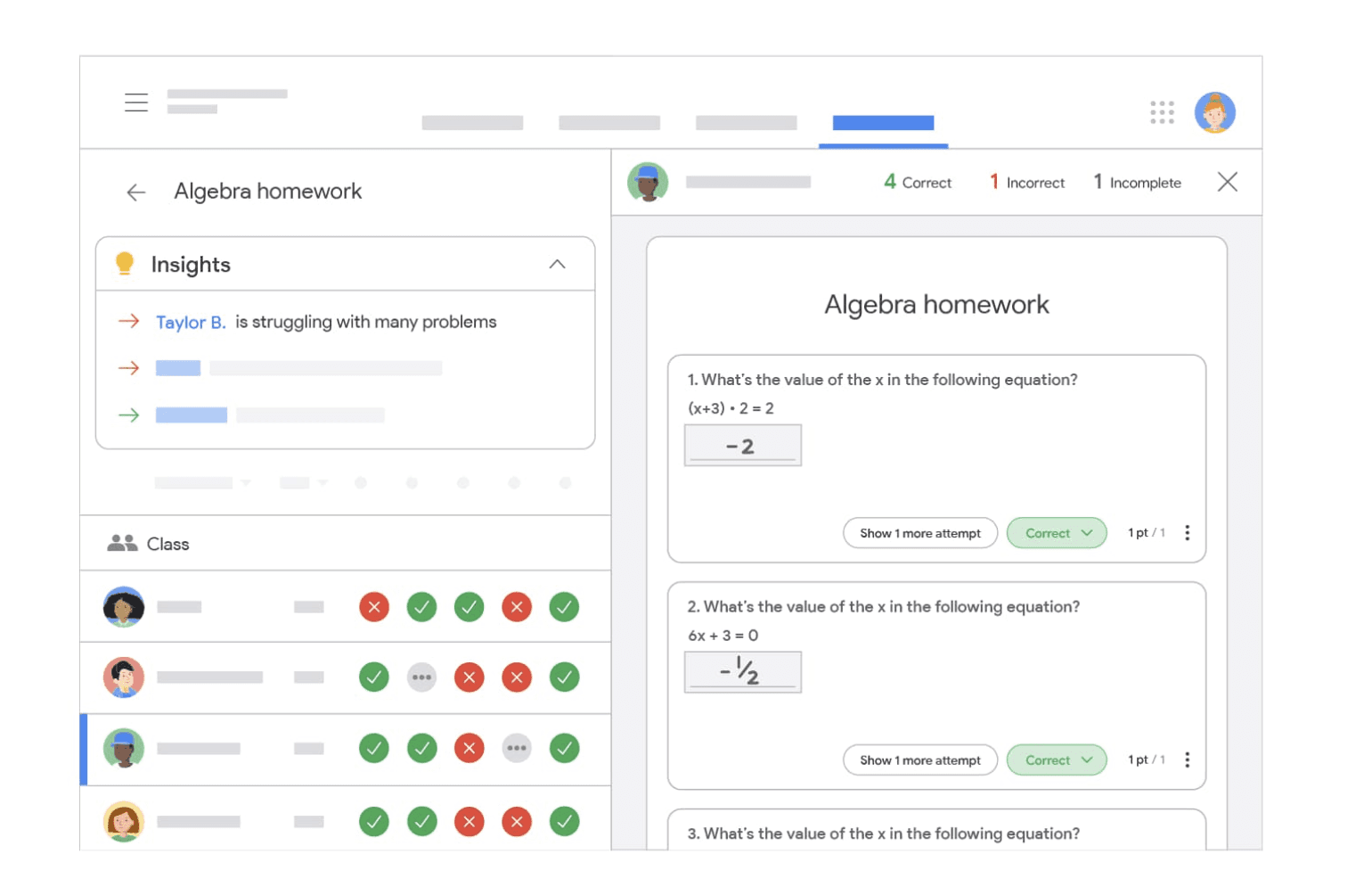
Google Classroom - Teacher Dashboard illustrates how Google Classroom structures teacher-facing analytics — including class average, assignment completion, and recent activity. The clean use of whitespace and modular layout informed Flip & Floss’s approach to information hierarchy for teachers managing multiple classes.
Google Classroom - Teacher Dashboard illustrates how Google Classroom structures teacher-facing analytics — including class average, assignment completion, and recent activity. The clean use of whitespace and modular layout informed Flip & Floss’s approach to information hierarchy for teachers managing multiple classes.
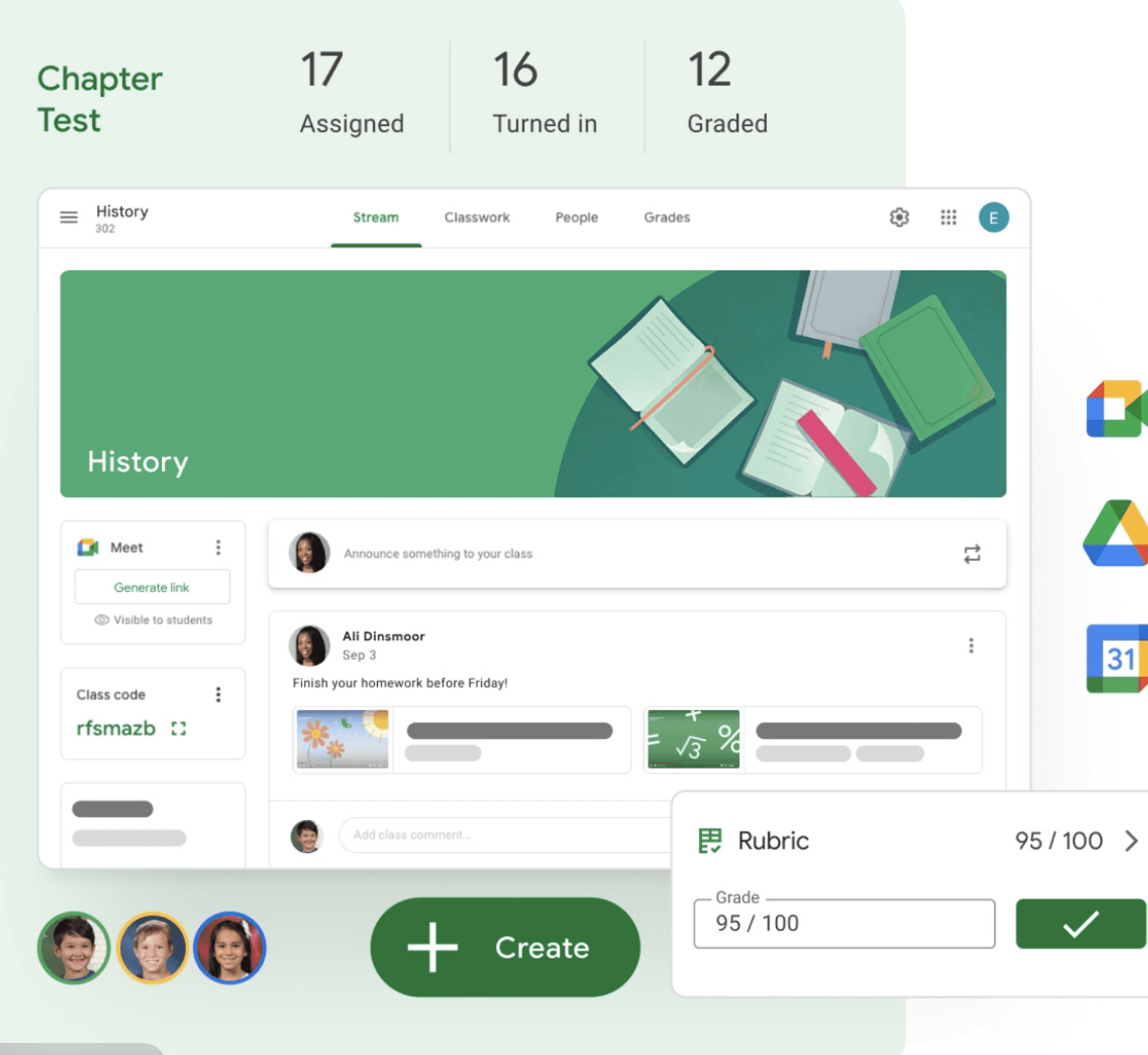
Canvas LMS Learning Analytics Overview’s performance dashboard visualizes student progress through color-coded scorecards and completion bars. This inspired our decision to use heatmaps and trend graphs for visual clarity in tracking engagement metrics.
Canvas LMS Learning Analytics Overview’s performance dashboard visualizes student progress through color-coded scorecards and completion bars. This inspired our decision to use heatmaps and trend graphs for visual clarity in tracking engagement metrics.
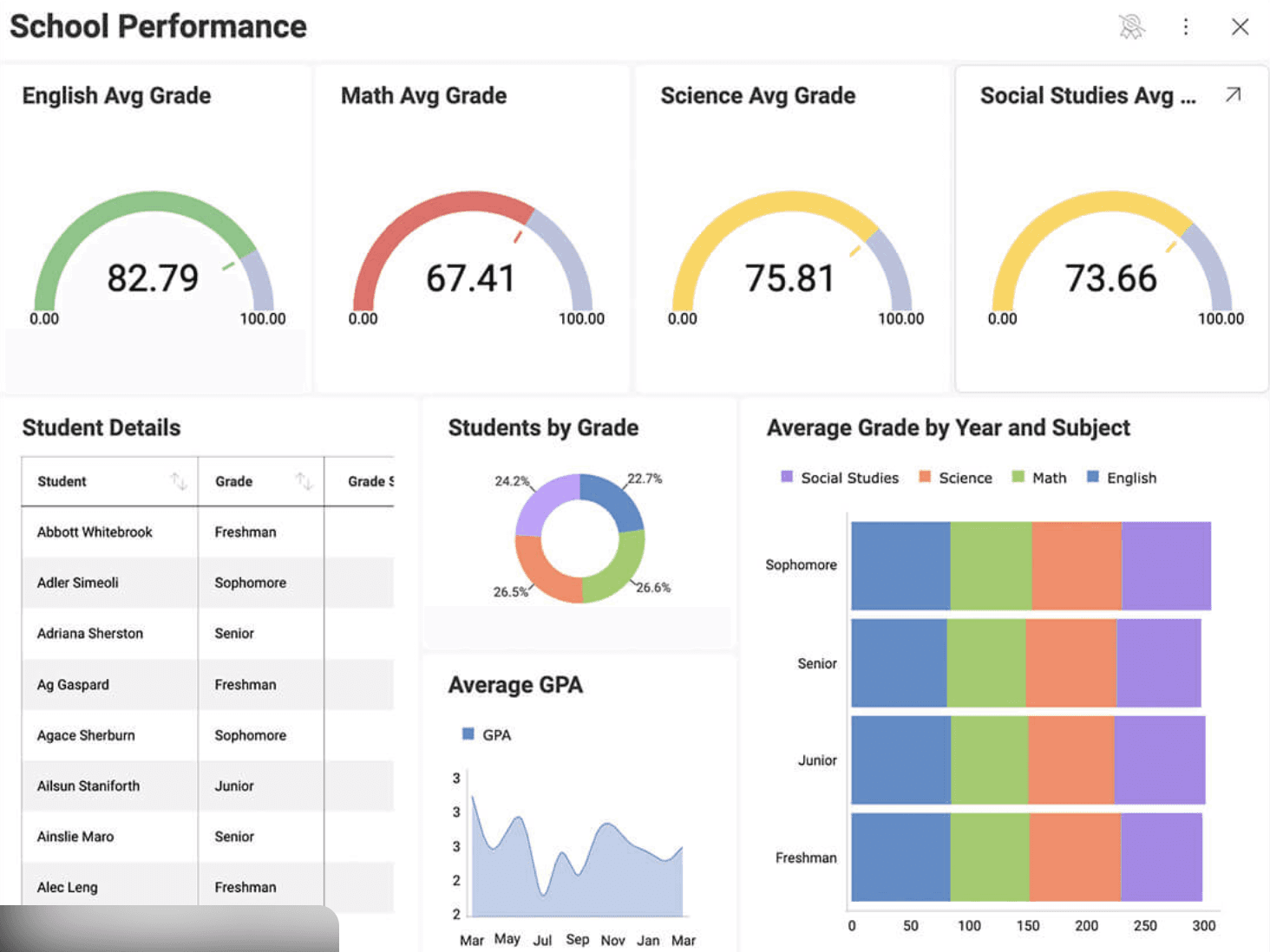
Schoolytics – Performance Insights Dashboard provides deep analytics for teacher performance tracking — including attendance, assignment completion, and intervention metrics. Its use of filters and visual data panels influenced Flip & Floss’s “filter by topic/date/status” feature for quick data segmentation.
Schoolytics – Performance Insights Dashboard provides deep analytics for teacher performance tracking — including attendance, assignment completion, and intervention metrics. Its use of filters and visual data panels influenced Flip & Floss’s “filter by topic/date/status” feature for quick data segmentation.
Design Implications:
Design Implications:
TeacherEase provided a strong analytics framework but was text-heavy and unintuitive.
Schoolytics excelled in real-time visualization and heatmaps.
Google Classroom emphasized embedded actions like “Send reminder” and “View report.”
From here, we defined Flip & Floss’s guiding principle: merge analytics with action ensuring every data point empowers teachers to make an immediate, meaningful teaching decision.
TeacherEase provided a strong analytics framework but was text-heavy and unintuitive.
Schoolytics excelled in real-time visualization and heatmaps.
Google Classroom emphasized embedded actions like “Send reminder” and “View report.”
From here, we defined Flip & Floss’s guiding principle: merge analytics with action ensuring every data point empowers teachers to make an immediate, meaningful teaching decision.

Define
Define
We defined two primary focus tracks — Performance and Behavior — to clarify teacher goals and streamline flow development across the analytics experience.
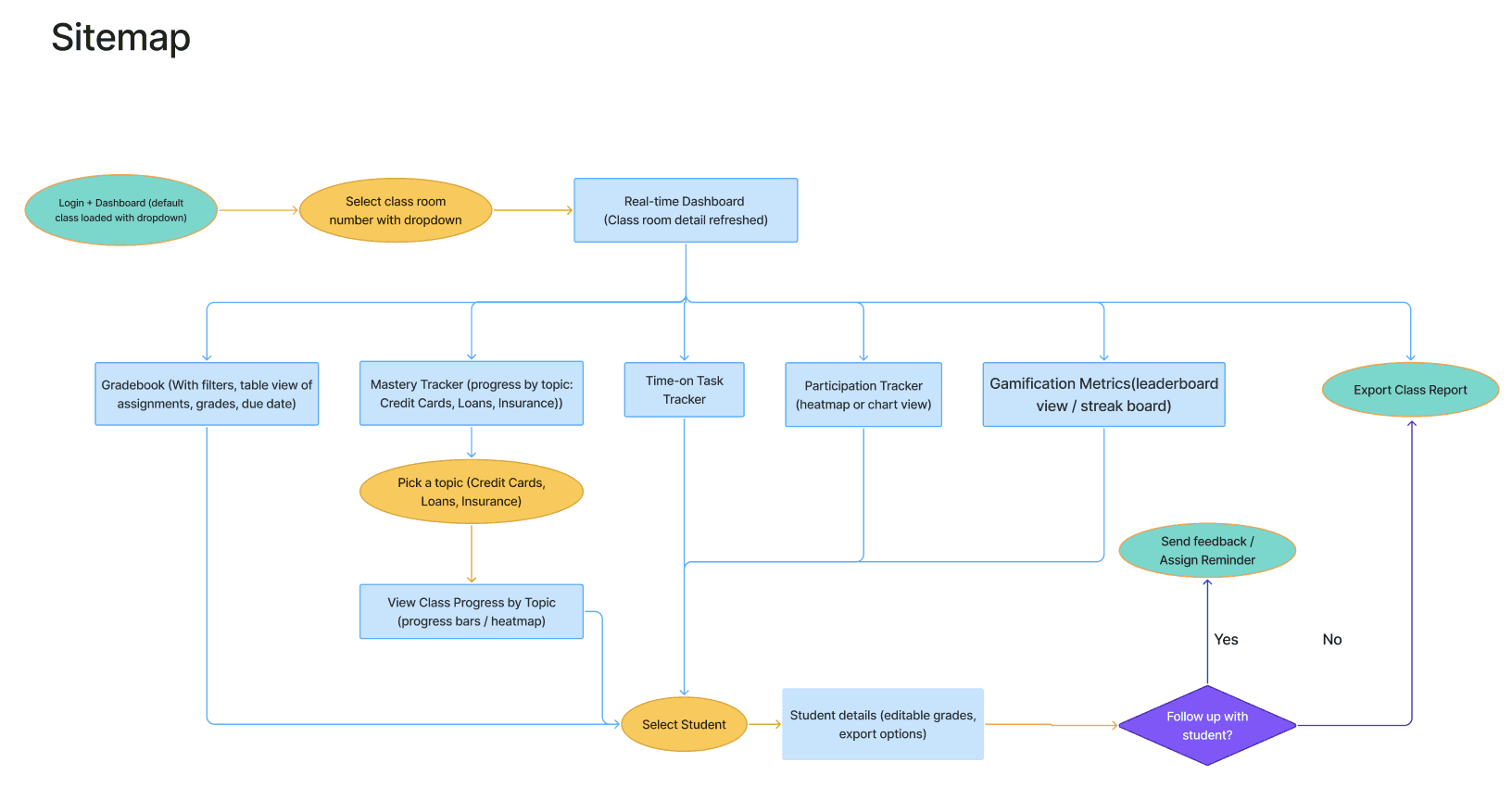
After identifying teacher pain points, I created a sitemap to establish the platform’s structure, mapping key screens under each track to ensure clarity between data-driven and engagement features.
We defined two primary focus tracks — Performance and Behavior — to clarify teacher goals and streamline flow development across the analytics experience.
After identifying teacher pain points, I created a sitemap to establish the platform’s structure, mapping key screens under each track to ensure clarity between data-driven and engagement features.

Each of these user flows corresponded to a section or feature in the new design. By mapping out these flows, we ensured the interface would support the full spectrum of teacher needs – from big-picture class trends down to individual student interventions.
We also made sure that transitioning between these flows would be smooth (for example, from the class dashboard a teacher can click on a specific student to jump into that student’s detailed view, fulfilling multiple flows in sequence).
Each of these user flows corresponded to a section or feature in the new design. By mapping out these flows, we ensured the interface would support the full spectrum of teacher needs – from big-picture class trends down to individual student interventions.
We also made sure that transitioning between these flows would be smooth (for example, from the class dashboard a teacher can click on a specific student to jump into that student’s detailed view, fulfilling multiple flows in sequence).
Performance
Performance
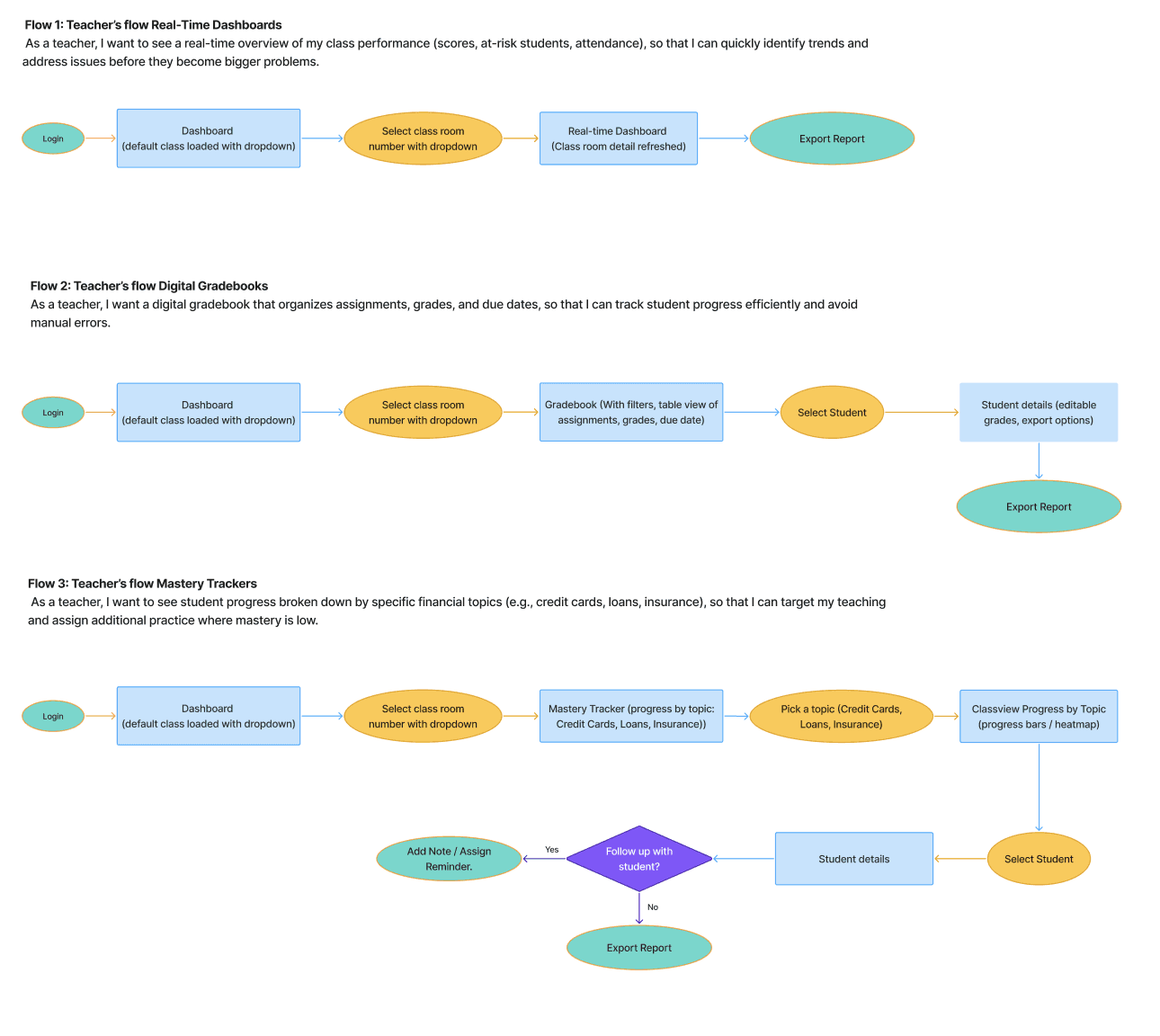
“As a teacher, I want to see a real-time overview of my class performance (scores, at-risk students, attendance), so I can quickly identify trends and address issues before they become bigger problems.”
“As a teacher, I want to see a real-time overview of my class performance (scores, at-risk students, attendance), so I can quickly identify trends and address issues before they become bigger problems.”
“As a teacher, I want a digital gradebook that organizes assignments, grades, and due dates, so that I can track student progress efficiently and avoid manual errors.”
“As a teacher, I want a digital gradebook that organizes assignments, grades, and due dates, so that I can track student progress efficiently and avoid manual errors.”
“As a teacher, I want to see student progress broken down by specific financial topics (e.g. credit cards, loans, insurance), so that I can target my teaching and assign additional practice where mastery is low.”
“As a teacher, I want to see student progress broken down by specific financial topics (e.g. credit cards, loans, insurance), so that I can target my teaching and assign additional practice where mastery is low.”
Behavior
Behavior
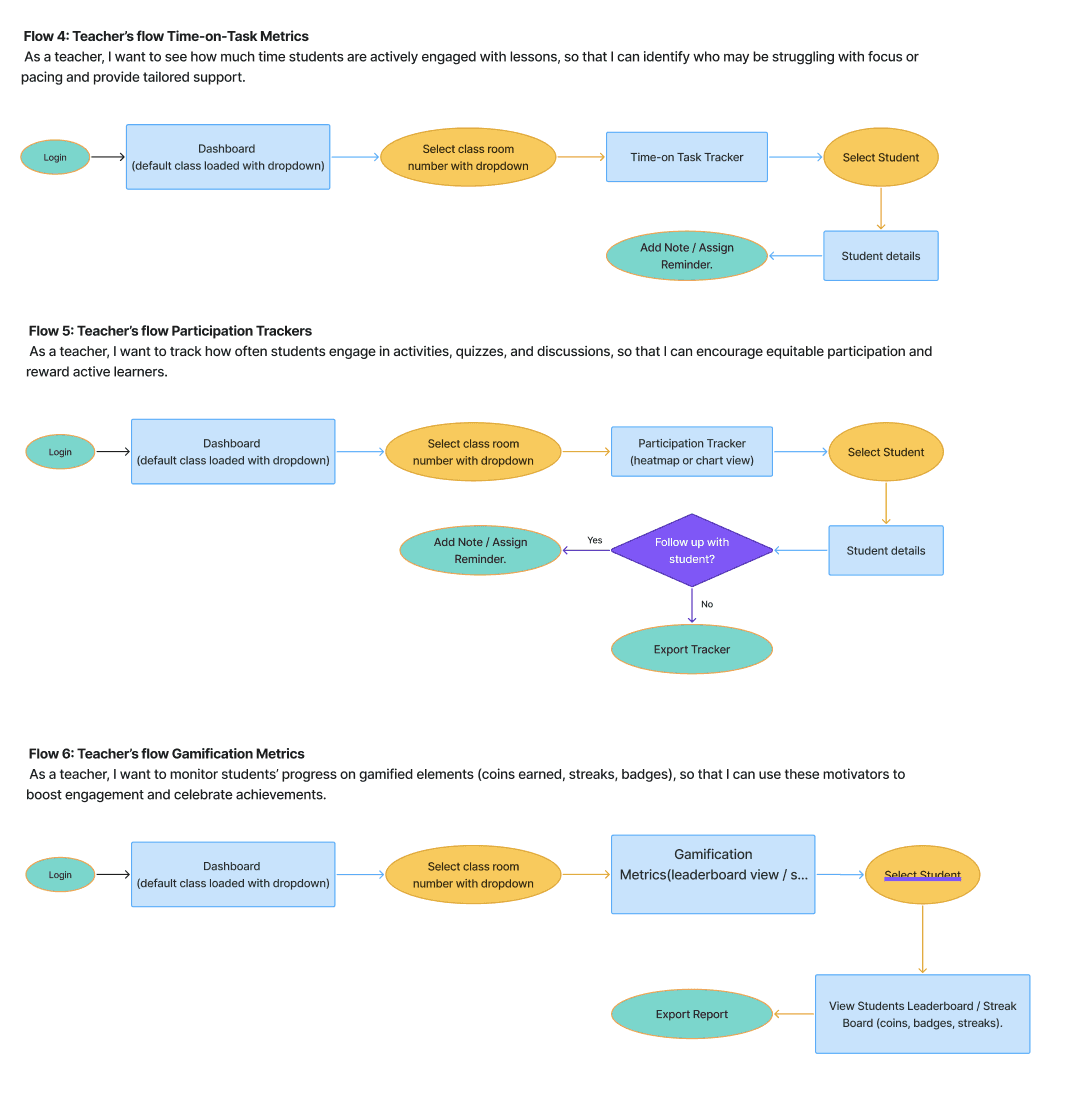
“As a teacher, I want to see how much time students are actively engaged with lessons, so that I can identify who may be struggling with focus or pacing and provide tailored support.”
“As a teacher, I want to see how much time students are actively engaged with lessons, so that I can identify who may be struggling with focus or pacing and provide tailored support.”
“As a teacher, I want to track how often students engage in activities, quizzes, and discussions, so that I can encourage equitable participation and reward active learners.”
“As a teacher, I want to track how often students engage in activities, quizzes, and discussions, so that I can encourage equitable participation and reward active learners.”
“As a teacher, I want to monitor students’ progress on gamified elements (coins earned, streaks, badges), so that I can use these motivators to boost engagement and celebrate achievements.”
“As a teacher, I want to monitor students’ progress on gamified elements (coins earned, streaks, badges), so that I can use these motivators to boost engagement and celebrate achievements.”
Ideate
Ideate
With the structure in place, I mapped detailed userflows for six teacher journeys — fensuring smooth transitions and cross-linking between Performance and Behavior flows.
With the structure in place, I mapped detailed userflows for six teacher journeys — fensuring smooth transitions and cross-linking between Performance and Behavior flows.

Our team followed an iterative, sprint design process. As the Design Lead, I coordinated two teammates and structured weekly deliverables to maintain focus and accountability.
In the first sprint, we finalized research insights and translated them into clear design requirements. I created the sitemap and userflow drafts to visualize how teachers would navigate between Performance and Behavior features. These early artifacts were reviewed with the client to align on direction before advancing to wireframes.
Over the following weeks, we moved from low-fidelity sketches to high-fidelity prototypes, dividing tasks based on strengths — one designer focused on dashboards and navigation, another on analytics and gradebook, while I ensured visual consistency and overall UX cohesion.
Regular client check-ins helped us iterate efficiently. After feedback, we introduced a Quick Actions panel on the dashboard, enabling teachers to act instantly on insights.
Throughout, we applied UX heuristics and data visualization principles, ensuring clarity, accessibility, and meaningful visual hierarchy. The final prototype tested positively with educators, who found the new userflows far more intuitive and cohesive for real classroom use.
Our team followed an iterative, sprint design process. As the Design Lead, I coordinated two teammates and structured weekly deliverables to maintain focus and accountability.
In the first sprint, we finalized research insights and translated them into clear design requirements. I created the sitemap and userflow drafts to visualize how teachers would navigate between Performance and Behavior features. These early artifacts were reviewed with the client to align on direction before advancing to wireframes.
Over the following weeks, we moved from low-fidelity sketches to high-fidelity prototypes, dividing tasks based on strengths — one designer focused on dashboards and navigation, another on analytics and gradebook, while I ensured visual consistency and overall UX cohesion.
Regular client check-ins helped us iterate efficiently. After feedback, we introduced a Quick Actions panel on the dashboard, enabling teachers to act instantly on insights.
Throughout, we applied UX heuristics and data visualization principles, ensuring clarity, accessibility, and meaningful visual hierarchy. The final prototype tested positively with educators, who found the new userflows far more intuitive and cohesive for real classroom use.
As the Design Lead, I structured the project into weekly milestones:
Week 1 → Research & Define userflows
Week 2 → Sitemap + low-fidelity flows
Week 3 → Mid-fi prototypes + client review
Week 4 → High-fi visuals & documentation
As the Design Lead, I structured the project into weekly milestones:
Week 1 → Research & Define userflows
Week 2 → Sitemap + low-fidelity flows
Week 3 → Mid-fi prototypes + client review
Week 4 → High-fi visuals & documentation
Leadership & Collaboration
Leadership & Collaboration

Each teammate was assigned based on their strengths — one focused on UI execution, the other on competitor and interaction research — while I oversaw the overall structure, alignment, and final quality.
I held weekly client updates to ensure transparency and alignment. My goal as a lead wasn’t just task management but mentorship — guiding discussions on design reasoning and helping teammates connect their flows into a unified experience.
During one review, the client emphasized the need for quick interventions for at-risk students. I proposed adding a Quick Actions panel across the dashboard, allowing teachers to “Send Feedback,” “Assign Practice,” or “Export Reports” without leaving the page. That decision became a cornerstone interaction pattern across flows.
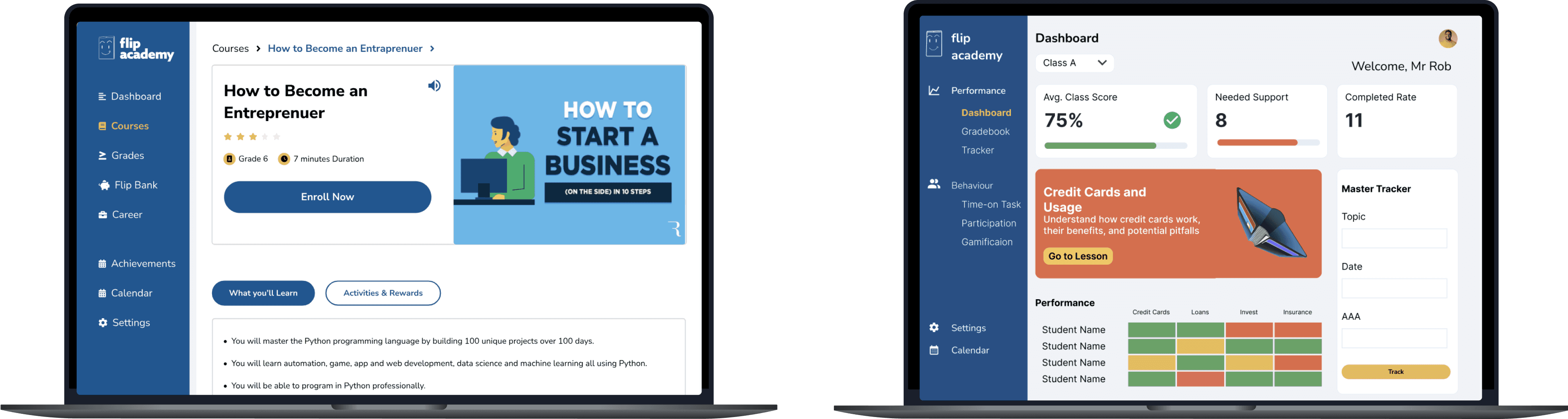
Figure 2: Flip & Floss Teacher Dashboard — unified overview combining Performance Summary, Mastery Heatmap, and Quick Actions.
Each teammate was assigned based on their strengths — one focused on UI execution, the other on competitor and interaction research — while I oversaw the overall structure, alignment, and final quality.
I held weekly client updates to ensure transparency and alignment. My goal as a lead wasn’t just task management but mentorship — guiding discussions on design reasoning and helping teammates connect their flows into a unified experience.
During one review, the client emphasized the need for quick interventions for at-risk students. I proposed adding a Quick Actions panel across the dashboard, allowing teachers to “Send Feedback,” “Assign Practice,” or “Export Reports” without leaving the page. That decision became a cornerstone interaction pattern across flows.
Figure 2: Flip & Floss Teacher Dashboard — unified overview combining Performance Summary, Mastery Heatmap, and Quick Actions.
Final Design Solution
Final Design Solution

The end result of our work is a streamlined teacher dashboard and analytics suite for Flip & Floss. The design introduces a left-side navigation menu for major sections (e.g. Performance, Behavior, Settings), and within the Performance section, teachers can switch between sub-pages (Overview, Gradebook, Mastery Tracker, etc.) using tabs.
This structure keeps all related features in one area, reducing the need to jump around the app. We consolidated key information into the Overview dashboard page, while still allowing deeper exploration in the specialized tabs or by drilling down on specific classes or students.
The interface is clean and uncluttered, with an emphasis on clear typography and intuitive icons so that teachers of varying tech comfort can use it with ease. Data is presented visually wherever appropriate – for instance, trend lines show progress over time, and topic mastery is shown with colored bars instead of just percentages, so patterns are easier to see.
Crucially, the design makes analytics actionable: wherever a data point might indicate a problem, we include a directly associated action (e.g. a flagged risk student appears in an intervention list with a “Send Feedback” button next to their name).
The end result of our work is a streamlined teacher dashboard and analytics suite for Flip & Floss. The design introduces a left-side navigation menu for major sections (e.g. Performance, Behavior, Settings), and within the Performance section, teachers can switch between sub-pages (Overview, Gradebook, Mastery Tracker, etc.) using tabs.
This structure keeps all related features in one area, reducing the need to jump around the app. We consolidated key information into the Overview dashboard page, while still allowing deeper exploration in the specialized tabs or by drilling down on specific classes or students.
The interface is clean and uncluttered, with an emphasis on clear typography and intuitive icons so that teachers of varying tech comfort can use it with ease. Data is presented visually wherever appropriate – for instance, trend lines show progress over time, and topic mastery is shown with colored bars instead of just percentages, so patterns are easier to see.
Crucially, the design makes analytics actionable: wherever a data point might indicate a problem, we include a directly associated action (e.g. a flagged risk student appears in an intervention list with a “Send Feedback” button next to their name).
Prototype
Prototype
Assign Tasks
Assign Tasks
Assign Tasks
Assign Tasks
Assign Tasks
Assign Tasks
Assign Courses
Assign Courses
Assign Courses
Assign Courses
Assign Courses
Assign Courses
Task/Course Completion Rate - Grading Scale
Task/Course Completion Rate - Grading Scale
0-50%
0-50%
51-70%
51-70%
71-100%
71-100%
Courses - Grade Level by Category
Courses - Grade Level by Category
Money Management and Personal Development
The Concept of Credit and Debt Management
Savings & Investment
Entrepreneurship and Taxes as
Money Management and Personal Development
The Concept of Credit and Debt Management
Savings & Investment
Entrepreneurship and Taxes as
8-10 y/o
8-10 y/o
10-12 y/o
10-12 y/o
10-12 y/o
10-12 y/o
12-14 y/o
12-14 y/o
3rd-5th grade
3rd-5th grade
5th-7th grade
5th-7th grade
5th-7th grade
5th-7th grade
7th-9th grade
7th-9th grade
Line Height
Line Height
Font Name: Nunito Sans - Regular
Font Name: Nunito Sans - Regular
Font Size
Font Size
Line Height
Line Height
Format
Format
Heading 1
Heading 1
Heading 2
Heading 2
Heading 3
Heading 3
Heading 4
Heading 4
Paragraph 1
Paragraph 1
Paragraph 2
Paragraph 2
Paragraph 3
Paragraph 3
Paragraph 4
Paragraph 4
56 px
56 px
48 px
48 px
40 px
40 px
32 px
32 px
24 px
24 px
20 px
20 px
16 px
16 px
52.8 px
52.8 px
44 px
44 px
35.2 px
35.2 px
26.4 px
26.4 px
22 px
22 px
17.6 px
17.6 px
13.2 px
13.2 px
61.6 px
61.6 px
12 px
12 px
$ USD
$ USD
$ CAD
$ CAD
FD
FD
$ USD
$ USD
$ CAD
$ CAD
FD
FD
$ USD
$ USD
$ CAD
$ CAD
FD
FD
$ USD
$ USD
$ CAD
$ CAD
FD
FD
$ USD
$ USD
$ CAD
$ CAD
FD
FD
$ USD
$ USD
$ CAD
$ CAD
FD
FD
$ USD
$ USD
$ CAD
$ CAD
FD
FD
$ USD
$ USD
$ CAD
$ CAD
FD
FD
Monthly
Monthly
One-time
One-time
Daily
Daily
Weekly
Weekly
Bi-weekly
Bi-weekly
Monthly
Monthly
One-time
One-time
Daily
Daily
Weekly
Weekly
Bi-weekly
Bi-weekly
Monthly
Monthly
One-time
One-time
Daily
Daily
Weekly
Weekly
Bi-weekly
Bi-weekly
Monthly
Monthly
One-time
One-time
Daily
Daily
Weekly
Weekly
Bi-weekly
Bi-weekly
Monthly
Monthly
One-time
One-time
Daily
Daily
Weekly
Weekly
Bi-weekly
Bi-weekly
Monthly
Monthly
One-time
One-time
Daily
Daily
Weekly
Weekly
Bi-weekly
Bi-weekly
Design Execution
Design Execution
Brand System & Guideline
Brand System & Guideline
Brand System & Guideline
Brand System & Guideline
Flip & Floss already had a defined brand palette, so rather than building a moodboard, I focused on applying and extending the existing identity to fit the teacher-facing interface.
The goal was to maintain brand consistency while improving clarity and accessibility across the analytics screens. The palette balances energy and focus — using Flip & Floss’s signature orange for highlights and action states, complemented by soft neutrals and subtle gradients to frame data-heavy content without overwhelming users.
Flip & Floss already had a defined brand palette, so rather than building a moodboard, I focused on applying and extending the existing identity to fit the teacher-facing interface.
The goal was to maintain brand consistency while improving clarity and accessibility across the analytics screens. The palette balances energy and focus — using Flip & Floss’s signature orange for highlights and action states, complemented by soft neutrals and subtle gradients to frame data-heavy content without overwhelming users.
Before diving into interface design, I created an updated Brand Guideline for the Flip & Floss Teacher Platform to ensure consistency across all touchpoints. While the core logo and colors were provided by the client, I developed this extended system, defining tone, typography, and visual hierarchy tailored to the educator-facing experience.
Before diving into interface design, I created an updated Brand Guideline for the Flip & Floss Teacher Platform to ensure consistency across all touchpoints. While the core logo and colors were provided by the client, I developed this extended system, defining tone, typography, and visual hierarchy tailored to the educator-facing experience.
This document aligned the team on how the Flip & Floss identity should translate into the teacher dashboard, balancing the platform’s playful student tone with a more professional and data-driven visual approach.
This document aligned the team on how the Flip & Floss identity should translate into the teacher dashboard, balancing the platform’s playful student tone with a more professional and data-driven visual approach.

BRAND GUIDELINE
BRAND GUIDELINE
BRAND LOGO
BRAND LOGO
Playful yet professional — balancing the kid-friendly identity with educator needs.
Clear, trustworthy, accessible — real-time data visualization made simple.
Modern 2025 UX/UI — clean layouts, white space, and intuitive navigation.
Playful yet professional — balancing the kid-friendly identity with educator needs.
Clear, trustworthy, accessible — real-time data visualization made simple.
Modern 2025 UX/UI — clean layouts, white space, and intuitive navigation.
Tone & Style
Tone & Style
TYPOGRAPHY
TYPOGRAPHY
Primary Typeface – Inter
Clean, legible, and modern. Works across dashboards, analytics, and interfaces. Wide weight range supports both bold headlines and detailed data.
Secondary Typeface – Helvetica
Used in communications and supporting materials. Adds a timeless, professional tone.
Together, these typefaces keep Flip & Floss accessible, trustworthy, and modern.
Primary Typeface – Inter
Clean, legible, and modern. Works across dashboards, analytics, and interfaces. Wide weight range supports both bold headlines and detailed data.
Secondary Typeface – Helvetica
Used in communications and supporting materials. Adds a timeless, professional tone.
Together, these typefaces keep Flip & Floss accessible, trustworthy, and modern.
For a fintech + edtech crossover like Flip & Floss, typography must balance trust and clarity (for teachers) with approachability (for students and parents).
For a fintech + edtech crossover like Flip & Floss, typography must balance trust and clarity (for teachers) with approachability (for students and parents).
Aa
Aa
Flip & Floss is a financial literacy EdTech platform designed to help children learn real money skills while giving teachers powerful tools to monitor progress and engagement.
The Teacher Platform extends this mission by offering streamlined dashboards, analytics, and intervention tools that empower educators to make quick, data-driven decisions in the classroom.
Flip & Floss is a financial literacy EdTech platform designed to help children learn real money skills while giving teachers powerful tools to monitor progress and engagement.
The Teacher Platform extends this mission by offering streamlined dashboards, analytics, and intervention tools that empower educators to make quick, data-driven decisions in the classroom.
BRAND OVERVIEW
BRAND OVERVIEW
Core Palette
Flip Blue (Deep) – #0046A6
Flip Blue (Primary) – #22568F
Golden Yellow – #D8B257
Dark Gray – #3A3A3A
Success Green – #2DBE60
Usage
Light tints → backgrounds, hover states.
Base colors → logo, navigation, CTAs.
Dark shades → text, active states, data viz.
Core Palette
Flip Blue (Deep) – #0046A6
Flip Blue (Primary) – #22568F
Golden Yellow – #D8B257
Dark Gray – #3A3A3A
Success Green – #2DBE60
Usage
Light tints → backgrounds, hover states.
Base colors → logo, navigation, CTAs.
Dark shades → text, active states, data viz.
MAIN COLORS
MAIN COLORS
This playful yet professional mark ensures that the Teacher Platform feels connected to Flip & Floss’s student identity while standing confidently in an educational context.
This playful yet professional mark ensures that the Teacher Platform feels connected to Flip & Floss’s student identity while standing confidently in an educational context.
BRAND MARK
BRAND MARK
View your children’s profiles here. Click
to expand for detailed insights.
View your children’s profiles here. Click
to expand for detailed insights.
Skip Tour
Skip Tour
Next
Next
View your children’s profiles here. Click
to expand for detailed insights.
View your children’s profiles here. Click
to expand for detailed insights.
Skip Tour
Skip Tour
Next
Next
View your children’s profiles here. Click
to expand for detailed insights.
View your children’s profiles here. Click
to expand for detailed insights.
Skip Tour
Skip Tour
Next
Next
View your children’s profiles here. Click
to expand for detailed insights.
View your children’s profiles here. Click
to expand for detailed insights.
Skip Tour
Skip Tour
Next
Next
View your children’s profiles here. Click
to expand for detailed insights.
View your children’s profiles here. Click
to expand for detailed insights.
Skip Tour
Skip Tour
Next
Next
View your children’s profiles here. Click
to expand for detailed insights.
View your children’s profiles here. Click
to expand for detailed insights.
Skip Tour
Skip Tour
Next
Next
With the design language established, I translated the userflows into cohesive UI layouts for each teacher task — from monitoring class performance to tracking engagement and behavior.
My focus was to balance readability and actionability, ensuring teachers could scan data quickly and act instantly. Each screen followed a clear visual hierarchy — primary metrics at the top, secondary actions below, and contextual insights (like quick actions or intervention queues) on the right panel.
With the design language established, I translated the userflows into cohesive UI layouts for each teacher task — from monitoring class performance to tracking engagement and behavior.
My focus was to balance readability and actionability, ensuring teachers could scan data quickly and act instantly. Each screen followed a clear visual hierarchy — primary metrics at the top, secondary actions below, and contextual insights (like quick actions or intervention queues) on the right panel.

Outcomes & Reflection
While the project is still in progress, our structured userflows helped Flip & Floss align its teacher experience roadmap.
The client shared early traction metrics showing increased visits from educators outside North America, validating the product’s global potential.
From a leadership perspective, this project strengthened my ability to lead a cross-functional design effort — balancing creative direction, communication, and delivery under startup constraints. I learned that the best leadership isn’t about control; it’s about clarity — ensuring everyone designs toward the same story.
Next steps include testing these flows with real educators and refining based on qualitative insights. But even now, the system we built demonstrates that clear, empathetic design structures can turn complex data into intuitive tools for teaching.
Outcomes & Reflection
While the project is still in progress, our structured userflows helped Flip & Floss align its teacher experience roadmap.
The client shared early traction metrics showing increased visits from educators outside North America, validating the product’s global potential.
From a leadership perspective, this project strengthened my ability to lead a cross-functional design effort — balancing creative direction, communication, and delivery under startup constraints. I learned that the best leadership isn’t about control; it’s about clarity — ensuring everyone designs toward the same story.
Next steps include testing these flows with real educators and refining based on qualitative insights. But even now, the system we built demonstrates that clear, empathetic design structures can turn complex data into intuitive tools for teaching.
Design Process
1
Research
2
Define
3
Ideate
4
Prototype
5
Refine
Before diving into research, I grounded the project in a design-thinking framework inspired by IDEO. Since Flip & Floss aimed to redesign complex teacher analytics into a more intuitive experience, this approach ensured every design decision stayed human-centered and data-driven.
As the Design Lead, I guided my team of three through each stage—emphasizing clarity, accountability, and collaborative iteration. We used this framework not only to structure our work but also to keep our goals aligned with the client’s mission of helping one million students learn financial literacy.
Flip & Floss is an innovative EdTech startup focused on financial literacy, with a mission to help one million children learn how to manage money confidently. Our design team was tasked to improve the teacher experience — specifically the Performance Tracking and Teacher Analytics features.
As the Design Lead, I led a 3-person team to conceptualize and design end-to-end userflows that would make teaching analytics simpler, faster, and more actionable.
Our goal was to design an experience where teachers could log in, instantly understand their class’s progress, and take direct actions — like assigning practice, tracking mastery, or sending feedback — all within one unified system.
Flip & Floss - Userflow Design
Role
Design Lead (Research, UX, UI)
Time length
3 weeks
Tools used
Figma
Prototype
Research
I began by researching platforms like TeacherEase, Schoolytics, EverFi, and Google Classroom to benchmark data systems and teacher workflows.
Google Classroom - Teacher Dashboard illustrates how Google Classroom structures teacher-facing analytics — including class average, assignment completion, and recent activity. The clean use of whitespace and modular layout informed Flip & Floss’s approach to information hierarchy for teachers managing multiple classes.
Canvas LMS Learning Analytics Overview’s performance dashboard visualizes student progress through color-coded scorecards and completion bars. This inspired our decision to use heatmaps and trend graphs for visual clarity in tracking engagement metrics.
Schoolytics – Performance Insights Dashboard provides deep analytics for teacher performance tracking — including attendance, assignment completion, and intervention metrics. Its use of filters and visual data panels influenced Flip & Floss’s “filter by topic/date/status” feature for quick data segmentation.
Design Implications:
TeacherEase provided a strong analytics framework but was text-heavy and unintuitive.
Schoolytics excelled in real-time visualization and heatmaps.
Google Classroom emphasized embedded actions like “Send reminder” and “View report.”
From here, we defined Flip & Floss’s guiding principle: merge analytics with action ensuring every data point empowers teachers to make an immediate, meaningful teaching decision.
Define
We defined two primary focus tracks — Performance and Behavior — to clarify teacher goals and streamline flow development across the analytics experience.
After identifying teacher pain points, I created a sitemap to establish the platform’s structure, mapping key screens under each track to ensure clarity between data-driven and engagement features.
Each of these user flows corresponded to a section or feature in the new design. By mapping out these flows, we ensured the interface would support the full spectrum of teacher needs – from big-picture class trends down to individual student interventions.
We also made sure that transitioning between these flows would be smooth (for example, from the class dashboard a teacher can click on a specific student to jump into that student’s detailed view, fulfilling multiple flows in sequence).
Performance
“As a teacher, I want to see a real-time overview of my class performance (scores, at-risk students, attendance), so I can quickly identify trends and address issues before they become bigger problems.”
“As a teacher, I want a digital gradebook that organizes assignments, grades, and due dates, so that I can track student progress efficiently and avoid manual errors.”
“As a teacher, I want to see student progress broken down by specific financial topics (e.g. credit cards, loans, insurance), so that I can target my teaching and assign additional practice where mastery is low.”
Behavior
“As a teacher, I want to see how much time students are actively engaged with lessons, so that I can identify who may be struggling with focus or pacing and provide tailored support.”
“As a teacher, I want to track how often students engage in activities, quizzes, and discussions, so that I can encourage equitable participation and reward active learners.”
“As a teacher, I want to monitor students’ progress on gamified elements (coins earned, streaks, badges), so that I can use these motivators to boost engagement and celebrate achievements.”
Ideate
With the structure in place, I mapped detailed userflows for six teacher journeys — fensuring smooth transitions and cross-linking between Performance and Behavior flows.
Our team followed an iterative, sprint design process. As the Design Lead, I coordinated two teammates and structured weekly deliverables to maintain focus and accountability.
In the first sprint, we finalized research insights and translated them into clear design requirements. I created the sitemap and userflow drafts to visualize how teachers would navigate between Performance and Behavior features. These early artifacts were reviewed with the client to align on direction before advancing to wireframes.
Over the following weeks, we moved from low-fidelity sketches to high-fidelity prototypes, dividing tasks based on strengths — one designer focused on dashboards and navigation, another on analytics and gradebook, while I ensured visual consistency and overall UX cohesion.
Regular client check-ins helped us iterate efficiently. After feedback, we introduced a Quick Actions panel on the dashboard, enabling teachers to act instantly on insights.
Throughout, we applied UX heuristics and data visualization principles, ensuring clarity, accessibility, and meaningful visual hierarchy. The final prototype tested positively with educators, who found the new userflows far more intuitive and cohesive for real classroom use.
As the Design Lead, I structured the project into weekly milestones:
Week 1 → Research & Define userflows
Week 2 → Sitemap + low-fidelity flows
Week 3 → Mid-fi prototypes + client review
Week 4 → High-fi visuals & documentation
Leadership & Collaboration
Each teammate was assigned based on their strengths — one focused on UI execution, the other on competitor and interaction research — while I oversaw the overall structure, alignment, and final quality.
I held weekly client updates to ensure transparency and alignment. My goal as a lead wasn’t just task management but mentorship — guiding discussions on design reasoning and helping teammates connect their flows into a unified experience.
During one review, the client emphasized the need for quick interventions for at-risk students. I proposed adding a Quick Actions panel across the dashboard, allowing teachers to “Send Feedback,” “Assign Practice,” or “Export Reports” without leaving the page. That decision became a cornerstone interaction pattern across flows.
Figure 2: Flip & Floss Teacher Dashboard — unified overview combining Performance Summary, Mastery Heatmap, and Quick Actions.
Final Design Solution
The end result of our work is a streamlined teacher dashboard and analytics suite for Flip & Floss. The design introduces a left-side navigation menu for major sections (e.g. Performance, Behavior, Settings), and within the Performance section, teachers can switch between sub-pages (Overview, Gradebook, Mastery Tracker, etc.) using tabs.
This structure keeps all related features in one area, reducing the need to jump around the app. We consolidated key information into the Overview dashboard page, while still allowing deeper exploration in the specialized tabs or by drilling down on specific classes or students.
The interface is clean and uncluttered, with an emphasis on clear typography and intuitive icons so that teachers of varying tech comfort can use it with ease. Data is presented visually wherever appropriate – for instance, trend lines show progress over time, and topic mastery is shown with colored bars instead of just percentages, so patterns are easier to see.
Crucially, the design makes analytics actionable: wherever a data point might indicate a problem, we include a directly associated action (e.g. a flagged risk student appears in an intervention list with a “Send Feedback” button next to their name).
Prototype
Assign Tasks
Assign Tasks
Assign Tasks
Assign Courses
Assign Courses
Assign Courses
Task/Course Completion Rate - Grading Scale
0-50%
51-70%
71-100%
Courses - Grade Level by Category
Money Management and Personal Development
The Concept of Credit and Debt Management
Savings & Investment
Entrepreneurship and Taxes as
8-10 y/o
10-12 y/o
10-12 y/o
12-14 y/o
3rd-5th grade
5th-7th grade
5th-7th grade
7th-9th grade
Line Height
Font Name: Nunito Sans - Regular
Font Size
Line Height
Format
Heading 1
Heading 2
Heading 3
Heading 4
Paragraph 1
Paragraph 2
Paragraph 3
Paragraph 4
56 px
48 px
40 px
32 px
24 px
20 px
16 px
52.8 px
44 px
35.2 px
26.4 px
22 px
17.6 px
13.2 px
61.6 px
12 px
$ USD
$ CAD
FD
$ USD
$ CAD
FD
$ USD
$ CAD
FD
$ USD
$ CAD
FD
$ USD
$ CAD
FD
$ USD
$ CAD
FD
$ USD
$ CAD
FD
$ USD
$ CAD
FD
Monthly
One-time
Daily
Weekly
Bi-weekly
Monthly
One-time
Daily
Weekly
Bi-weekly
Monthly
One-time
Daily
Weekly
Bi-weekly
Monthly
One-time
Daily
Weekly
Bi-weekly
Monthly
One-time
Daily
Weekly
Bi-weekly
Monthly
One-time
Daily
Weekly
Bi-weekly
Design Execution
Brand System & Guideline
Brand System & Guideline
Flip & Floss already had a defined brand palette, so rather than building a moodboard, I focused on applying and extending the existing identity to fit the teacher-facing interface.
The goal was to maintain brand consistency while improving clarity and accessibility across the analytics screens. The palette balances energy and focus — using Flip & Floss’s signature orange for highlights and action states, complemented by soft neutrals and subtle gradients to frame data-heavy content without overwhelming users.
Before diving into interface design, I created an updated Brand Guideline for the Flip & Floss Teacher Platform to ensure consistency across all touchpoints. While the core logo and colors were provided by the client, I developed this extended system, defining tone, typography, and visual hierarchy tailored to the educator-facing experience.
This document aligned the team on how the Flip & Floss identity should translate into the teacher dashboard, balancing the platform’s playful student tone with a more professional and data-driven visual approach.
BRAND GUIDELINE
BRAND LOGO
Playful yet professional — balancing the kid-friendly identity with educator needs.
Clear, trustworthy, accessible — real-time data visualization made simple.
Modern 2025 UX/UI — clean layouts, white space, and intuitive navigation.
Tone & Style
TYPOGRAPHY
Primary Typeface – Inter
Clean, legible, and modern. Works across dashboards, analytics, and interfaces. Wide weight range supports both bold headlines and detailed data.
Secondary Typeface – Helvetica
Used in communications and supporting materials. Adds a timeless, professional tone.
Together, these typefaces keep Flip & Floss accessible, trustworthy, and modern.
For a fintech + edtech crossover like Flip & Floss, typography must balance trust and clarity (for teachers) with approachability (for students and parents).
Aa
Flip & Floss is a financial literacy EdTech platform designed to help children learn real money skills while giving teachers powerful tools to monitor progress and engagement.
The Teacher Platform extends this mission by offering streamlined dashboards, analytics, and intervention tools that empower educators to make quick, data-driven decisions in the classroom.
BRAND OVERVIEW
Core Palette
Flip Blue (Deep) – #0046A6
Flip Blue (Primary) – #22568F
Golden Yellow – #D8B257
Dark Gray – #3A3A3A
Success Green – #2DBE60
Usage
Light tints → backgrounds, hover states.
Base colors → logo, navigation, CTAs.
Dark shades → text, active states, data viz.
MAIN COLORS
This playful yet professional mark ensures that the Teacher Platform feels connected to Flip & Floss’s student identity while standing confidently in an educational context.
BRAND MARK
View your children’s profiles here. Click
to expand for detailed insights.
Skip Tour
Next
View your children’s profiles here. Click
to expand for detailed insights.
Skip Tour
Next
View your children’s profiles here. Click
to expand for detailed insights.
Skip Tour
Next
View your children’s profiles here. Click
to expand for detailed insights.
Skip Tour
Next
View your children’s profiles here. Click
to expand for detailed insights.
Skip Tour
Next
View your children’s profiles here. Click
to expand for detailed insights.
Skip Tour
Next
With the design language established, I translated the userflows into cohesive UI layouts for each teacher task — from monitoring class performance to tracking engagement and behavior.
My focus was to balance readability and actionability, ensuring teachers could scan data quickly and act instantly. Each screen followed a clear visual hierarchy — primary metrics at the top, secondary actions below, and contextual insights (like quick actions or intervention queues) on the right panel.
Outcomes & Reflection
While the project is still in progress, our structured userflows helped Flip & Floss align its teacher experience roadmap.
The client shared early traction metrics showing increased visits from educators outside North America, validating the product’s global potential.
From a leadership perspective, this project strengthened my ability to lead a cross-functional design effort — balancing creative direction, communication, and delivery under startup constraints. I learned that the best leadership isn’t about control; it’s about clarity — ensuring everyone designs toward the same story.
Next steps include testing these flows with real educators and refining based on qualitative insights. But even now, the system we built demonstrates that clear, empathetic design structures can turn complex data into intuitive tools for teaching.
Design Process
1
Research
2
Define
3
Ideate
4
Prototype
5
Refine
Before diving into research, I grounded the project in a design-thinking framework inspired by IDEO. Since Flip & Floss aimed to redesign complex teacher analytics into a more intuitive experience, this approach ensured every design decision stayed human-centered and data-driven.
As the Design Lead, I guided my team of three through each stage—emphasizing clarity, accountability, and collaborative iteration. We used this framework not only to structure our work but also to keep our goals aligned with the client’s mission of helping one million students learn financial literacy.
Flip & Floss is an innovative EdTech startup focused on financial literacy, with a mission to help one million children learn how to manage money confidently. Our design team was tasked to improve the teacher experience — specifically the Performance Tracking and Teacher Analytics features.
As the Design Lead, I led a 3-person team to conceptualize and design end-to-end userflows that would make teaching analytics simpler, faster, and more actionable.
Our goal was to design an experience where teachers could log in, instantly understand their class’s progress, and take direct actions — like assigning practice, tracking mastery, or sending feedback — all within one unified system.
Flip & Floss - Userflow Design
Role
Design Lead (Research, UX, UI)
Time length
3 weeks
Tools used
Figma
Prototype
Research
I began by researching platforms like TeacherEase, Schoolytics, EverFi, and Google Classroom to benchmark data systems and teacher workflows.
Google Classroom - Teacher Dashboard illustrates how Google Classroom structures teacher-facing analytics — including class average, assignment completion, and recent activity. The clean use of whitespace and modular layout informed Flip & Floss’s approach to information hierarchy for teachers managing multiple classes.
Canvas LMS Learning Analytics Overview’s performance dashboard visualizes student progress through color-coded scorecards and completion bars. This inspired our decision to use heatmaps and trend graphs for visual clarity in tracking engagement metrics.
Schoolytics – Performance Insights Dashboard provides deep analytics for teacher performance tracking — including attendance, assignment completion, and intervention metrics. Its use of filters and visual data panels influenced Flip & Floss’s “filter by topic/date/status” feature for quick data segmentation.
Design Implications:
TeacherEase provided a strong analytics framework but was text-heavy and unintuitive.
Schoolytics excelled in real-time visualization and heatmaps.
Google Classroom emphasized embedded actions like “Send reminder” and “View report.”
From here, we defined Flip & Floss’s guiding principle: merge analytics with action ensuring every data point empowers teachers to make an immediate, meaningful teaching decision.
Define
We defined two primary focus tracks — Performance and Behavior — to clarify teacher goals and streamline flow development across the analytics experience.
After identifying teacher pain points, I created a sitemap to establish the platform’s structure, mapping key screens under each track to ensure clarity between data-driven and engagement features.
Each of these user flows corresponded to a section or feature in the new design. By mapping out these flows, we ensured the interface would support the full spectrum of teacher needs – from big-picture class trends down to individual student interventions.
We also made sure that transitioning between these flows would be smooth (for example, from the class dashboard a teacher can click on a specific student to jump into that student’s detailed view, fulfilling multiple flows in sequence).
Performance
“As a teacher, I want to see a real-time overview of my class performance (scores, at-risk students, attendance), so I can quickly identify trends and address issues before they become bigger problems.”
“As a teacher, I want a digital gradebook that organizes assignments, grades, and due dates, so that I can track student progress efficiently and avoid manual errors.”
“As a teacher, I want to see student progress broken down by specific financial topics (e.g. credit cards, loans, insurance), so that I can target my teaching and assign additional practice where mastery is low.”
Behavior
“As a teacher, I want to see how much time students are actively engaged with lessons, so that I can identify who may be struggling with focus or pacing and provide tailored support.”
“As a teacher, I want to track how often students engage in activities, quizzes, and discussions, so that I can encourage equitable participation and reward active learners.”
“As a teacher, I want to monitor students’ progress on gamified elements (coins earned, streaks, badges), so that I can use these motivators to boost engagement and celebrate achievements.”
Ideate
With the structure in place, I mapped detailed userflows for six teacher journeys — fensuring smooth transitions and cross-linking between Performance and Behavior flows.
Our team followed an iterative, sprint design process. As the Design Lead, I coordinated two teammates and structured weekly deliverables to maintain focus and accountability.
In the first sprint, we finalized research insights and translated them into clear design requirements. I created the sitemap and userflow drafts to visualize how teachers would navigate between Performance and Behavior features. These early artifacts were reviewed with the client to align on direction before advancing to wireframes.
Over the following weeks, we moved from low-fidelity sketches to high-fidelity prototypes, dividing tasks based on strengths — one designer focused on dashboards and navigation, another on analytics and gradebook, while I ensured visual consistency and overall UX cohesion.
Regular client check-ins helped us iterate efficiently. After feedback, we introduced a Quick Actions panel on the dashboard, enabling teachers to act instantly on insights.
Throughout, we applied UX heuristics and data visualization principles, ensuring clarity, accessibility, and meaningful visual hierarchy. The final prototype tested positively with educators, who found the new userflows far more intuitive and cohesive for real classroom use.
As the Design Lead, I structured the project into weekly milestones:
Week 1 → Research & Define userflows
Week 2 → Sitemap + low-fidelity flows
Week 3 → Mid-fi prototypes + client review
Week 4 → High-fi visuals & documentation
Leadership & Collaboration
Each teammate was assigned based on their strengths — one focused on UI execution, the other on competitor and interaction research — while I oversaw the overall structure, alignment, and final quality.
I held weekly client updates to ensure transparency and alignment. My goal as a lead wasn’t just task management but mentorship — guiding discussions on design reasoning and helping teammates connect their flows into a unified experience.
During one review, the client emphasized the need for quick interventions for at-risk students. I proposed adding a Quick Actions panel across the dashboard, allowing teachers to “Send Feedback,” “Assign Practice,” or “Export Reports” without leaving the page. That decision became a cornerstone interaction pattern across flows.
Figure 2: Flip & Floss Teacher Dashboard — unified overview combining Performance Summary, Mastery Heatmap, and Quick Actions.
Final Design Solution
The end result of our work is a streamlined teacher dashboard and analytics suite for Flip & Floss. The design introduces a left-side navigation menu for major sections (e.g. Performance, Behavior, Settings), and within the Performance section, teachers can switch between sub-pages (Overview, Gradebook, Mastery Tracker, etc.) using tabs.
This structure keeps all related features in one area, reducing the need to jump around the app. We consolidated key information into the Overview dashboard page, while still allowing deeper exploration in the specialized tabs or by drilling down on specific classes or students.
The interface is clean and uncluttered, with an emphasis on clear typography and intuitive icons so that teachers of varying tech comfort can use it with ease. Data is presented visually wherever appropriate – for instance, trend lines show progress over time, and topic mastery is shown with colored bars instead of just percentages, so patterns are easier to see.
Crucially, the design makes analytics actionable: wherever a data point might indicate a problem, we include a directly associated action (e.g. a flagged risk student appears in an intervention list with a “Send Feedback” button next to their name).
Prototype
Assign Tasks
Assign Tasks
Assign Tasks
Assign Courses
Assign Courses
Assign Courses
Task/Course Completion Rate - Grading Scale
0-50%
51-70%
71-100%
Courses - Grade Level by Category
Money Management and Personal Development
The Concept of Credit and Debt Management
Savings & Investment
Entrepreneurship and Taxes as
8-10 y/o
10-12 y/o
10-12 y/o
12-14 y/o
3rd-5th grade
5th-7th grade
5th-7th grade
7th-9th grade
Line Height
Font Name: Nunito Sans - Regular
Font Size
Line Height
Format
Heading 1
Heading 2
Heading 3
Heading 4
Paragraph 1
Paragraph 2
Paragraph 3
Paragraph 4
56 px
48 px
40 px
32 px
24 px
20 px
16 px
52.8 px
44 px
35.2 px
26.4 px
22 px
17.6 px
13.2 px
61.6 px
12 px
$ USD
$ CAD
FD
$ USD
$ CAD
FD
$ USD
$ CAD
FD
$ USD
$ CAD
FD
$ USD
$ CAD
FD
$ USD
$ CAD
FD
$ USD
$ CAD
FD
$ USD
$ CAD
FD
Monthly
One-time
Daily
Weekly
Bi-weekly
Monthly
One-time
Daily
Weekly
Bi-weekly
Monthly
One-time
Daily
Weekly
Bi-weekly
Monthly
One-time
Daily
Weekly
Bi-weekly
Monthly
One-time
Daily
Weekly
Bi-weekly
Monthly
One-time
Daily
Weekly
Bi-weekly
Design Execution
Brand System & Guideline
Brand System & Guideline
Flip & Floss already had a defined brand palette, so rather than building a moodboard, I focused on applying and extending the existing identity to fit the teacher-facing interface.
The goal was to maintain brand consistency while improving clarity and accessibility across the analytics screens. The palette balances energy and focus — using Flip & Floss’s signature orange for highlights and action states, complemented by soft neutrals and subtle gradients to frame data-heavy content without overwhelming users.
Before diving into interface design, I created an updated Brand Guideline for the Flip & Floss Teacher Platform to ensure consistency across all touchpoints. While the core logo and colors were provided by the client, I developed this extended system, defining tone, typography, and visual hierarchy tailored to the educator-facing experience.
This document aligned the team on how the Flip & Floss identity should translate into the teacher dashboard, balancing the platform’s playful student tone with a more professional and data-driven visual approach.
BRAND GUIDELINE
BRAND LOGO
Playful yet professional — balancing the kid-friendly identity with educator needs.
Clear, trustworthy, accessible — real-time data visualization made simple.
Modern 2025 UX/UI — clean layouts, white space, and intuitive navigation.
Tone & Style
TYPOGRAPHY
Primary Typeface – Inter
Clean, legible, and modern. Works across dashboards, analytics, and interfaces. Wide weight range supports both bold headlines and detailed data.
Secondary Typeface – Helvetica
Used in communications and supporting materials. Adds a timeless, professional tone.
Together, these typefaces keep Flip & Floss accessible, trustworthy, and modern.
For a fintech + edtech crossover like Flip & Floss, typography must balance trust and clarity (for teachers) with approachability (for students and parents).
Aa
Flip & Floss is a financial literacy EdTech platform designed to help children learn real money skills while giving teachers powerful tools to monitor progress and engagement.
The Teacher Platform extends this mission by offering streamlined dashboards, analytics, and intervention tools that empower educators to make quick, data-driven decisions in the classroom.
BRAND OVERVIEW
Core Palette
Flip Blue (Deep) – #0046A6
Flip Blue (Primary) – #22568F
Golden Yellow – #D8B257
Dark Gray – #3A3A3A
Success Green – #2DBE60
Usage
Light tints → backgrounds, hover states.
Base colors → logo, navigation, CTAs.
Dark shades → text, active states, data viz.
MAIN COLORS
This playful yet professional mark ensures that the Teacher Platform feels connected to Flip & Floss’s student identity while standing confidently in an educational context.
BRAND MARK
View your children’s profiles here. Click
to expand for detailed insights.
Skip Tour
Next
View your children’s profiles here. Click
to expand for detailed insights.
Skip Tour
Next
View your children’s profiles here. Click
to expand for detailed insights.
Skip Tour
Next
View your children’s profiles here. Click
to expand for detailed insights.
Skip Tour
Next
View your children’s profiles here. Click
to expand for detailed insights.
Skip Tour
Next
View your children’s profiles here. Click
to expand for detailed insights.
Skip Tour
Next
With the design language established, I translated the userflows into cohesive UI layouts for each teacher task — from monitoring class performance to tracking engagement and behavior.
My focus was to balance readability and actionability, ensuring teachers could scan data quickly and act instantly. Each screen followed a clear visual hierarchy — primary metrics at the top, secondary actions below, and contextual insights (like quick actions or intervention queues) on the right panel.
Outcomes & Reflection
While the project is still in progress, our structured userflows helped Flip & Floss align its teacher experience roadmap.
The client shared early traction metrics showing increased visits from educators outside North America, validating the product’s global potential.
From a leadership perspective, this project strengthened my ability to lead a cross-functional design effort — balancing creative direction, communication, and delivery under startup constraints. I learned that the best leadership isn’t about control; it’s about clarity — ensuring everyone designs toward the same story.
Next steps include testing these flows with real educators and refining based on qualitative insights. But even now, the system we built demonstrates that clear, empathetic design structures can turn complex data into intuitive tools for teaching.